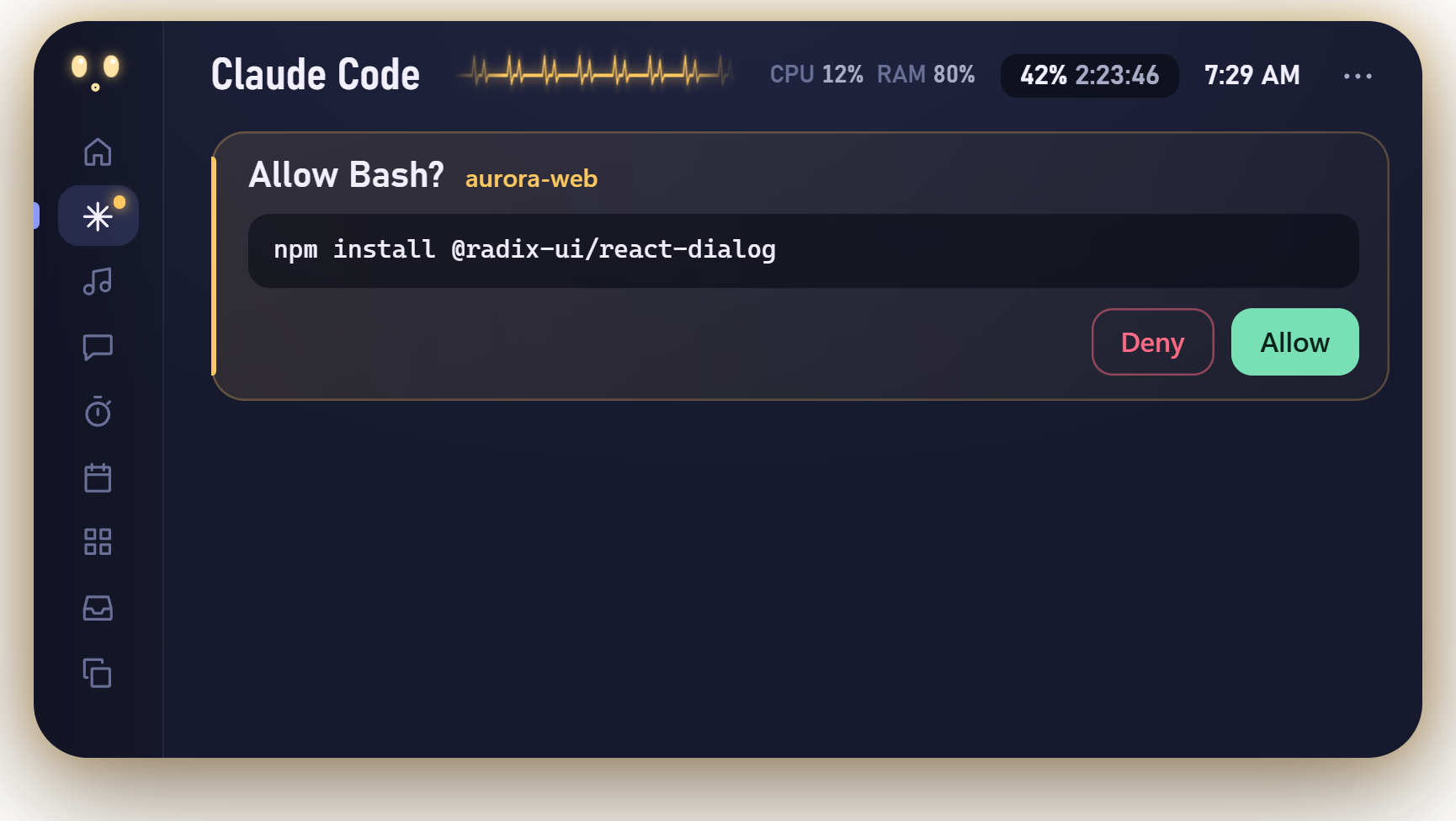
When Claude Code wants to run a command, it stops and asks. If you’re in another window, you find out minutes later that nothing happened. Pulse fixes that: the request appears in a small island at the top of your screen, with Allow and Deny, and your answer goes straight back to Claude Code.
There’s no plugin API or screen scraping involved. It’s Claude Code’s own hooks, a small HTTP server on 127.0.0.1, and one trick with the Stop hook. This post walks through all of it, including exactly what Pulse writes to your settings.
Hooks, over HTTP
Claude Code runs hooks at points in its lifecycle: a session starts, you submit a prompt, a tool is about to run, a tool finished, Claude stopped. A hook is usually a shell command, but it can also be an HTTP hook: Claude Code POSTs the event’s JSON to a URL and reads the response.
That’s perfect for a desktop app that’s already running. No script has to start for every event, and the app gets the events as they happen. When you click Connect, Pulse adds an HTTP hook for ten events to ~/.claude/settings.json. Each looks like this (the token is different on every install):
"PreToolUse": [{
  "hooks": [{
    "type": "http",
    "url": "http://127.0.0.1:47900/pulse/hook",
    "timeout": 3,
    "headers": { "X-Pulse-Token": "3f9c…" }
  }]
}]
The ten events are SessionStart, UserPromptSubmit, PreToolUse, PostToolUse, PostToolUseFailure, PermissionRequest, Notification, Stop, StopFailure and SessionEnd. From those, Pulse’s hub (src/main/hub.js) keeps a small model of each session: the prompt, the steps (“Reading nav.css”, “Running npm test”), a short diff of the last edit, the tail of the last command’s output, and whether Claude is working, asking, done or failed.
Most hooks get a 3-second timeout. If Pulse isn’t running, the connection fails, and the docs treat that as a non-blocking error, so Claude Code carries on as if Pulse weren’t there. Quitting Pulse never stalls your session.
Holding a PermissionRequest open
The interesting event is PermissionRequest. It fires when Claude Code is about to ask you whether it may use a tool, and the hook can answer for you. The answer goes in the response body:
{
  "hookSpecificOutput": {
    "hookEventName": "PermissionRequest",
    "decision": { "behavior": "allow", "updatedInput": { "command": "npm test" } }
  }
}
Most hooks answer straight away. Pulse doesn’t. It keeps the HTTP response open until you click something in the island:
case 'PermissionRequest': {
  // ...work out what's being asked, show it in the island...
  if (res) {
    const timer = setTimeout(() => { this.#release(id); }, PERMISSION_TIMEOUT_S * 1000);
    this.holds.set(id, { res, timer });
    held = true;          // don't send a response yet
  }
  this.emit('attention', s);
  break;
}
When you click Allow, Pulse finishes the response with an allow decision. Deny sends { "behavior": "deny", "message": "Denied from Pulse." }, which Claude sees as the reason. Claude Code is just waiting on an HTTP request, so it carries on as soon as the response arrives.
Three details make this safe to live with:
- A time limit. Pulse gives up after 5 minutes and sends an empty 200 response. An empty response means “no decision”, so Claude Code falls back to its normal prompt in the terminal. The hook’s own timeout in
settings.jsonis 310 seconds, a little longer, so Pulse always answers first. - You can still answer in the terminal. If you answer there instead, the next event for that session (a
PostToolUse, say) tells Pulse the question is settled, and it releases the held request. - Exit code 2 doesn’t work here. The docs say exit code 2 isn’t honoured for
PermissionRequest; you deny through thedecisionobject. Pulse only ever answers with JSON.
Questions and plans use the same door
When Claude asks a multiple-choice question (AskUserQuestion) or presents a plan (ExitPlanMode), that also arrives as a PermissionRequest. Pulse shows the options or the plan in the island. Your choice goes back in updatedInput, with the answers added next to the original questions:
this.#settle(id, {
  behavior: 'allow',
  updatedInput: { ...p.input, answers: { 'Which framework?': 'React' } },
}, 'Answer sent');
Rejecting a plan is a deny whose message carries your feedback: “The user wants changes to the plan: …”. Claude reads that and revises.
The token, and why timingSafeEqual
A server on 127.0.0.1:47900 is only reachable from your own computer, but that still includes every program you run, and in some cases web pages too. A server that can approve shell commands needs to know who’s talking.
On first launch, Pulse makes a random token (24 bytes, as hex) and saves it in its own data folder, readable only by you on macOS. The same token goes into the hook headers in settings.json. Every request has to carry it, or it gets a bare 403:
#authorized(req) {
  const given = Buffer.from(String(req.headers['x-pulse-token'] || ''));
  return given.length === this.token.length && timingSafeEqual(given, this.token);
}

#onRequest(req, res) {
  const route = String(req.url).split('?')[0];
  if (req.method !== 'POST' || !Object.values(ROUTES).includes(route) || !this.#authorized(req)) {
    req.resume(); res.writeHead(403).end(); return;
  }
  // ...
}
crypto.timingSafeEqual compares the whole buffer in constant time, so how long a wrong guess takes doesn’t reveal how many characters were right. Over loopback that’s a small risk, but it costs one line. Only POST is accepted, and a web page can’t set a custom X-Pulse-Token header on a cross-origin request without a CORS preflight, which Pulse never answers. Bodies are capped at 1 MB.
The token is stored in plain text in settings.json. Anything that can read your home folder can read it, and anything that can do that already has bigger powers than approving one command.
The Stop hook reply trick
Sometimes Claude finishes by asking you something in plain text: “Want me to add tests for this too?” There’s no permission request to answer. The turn is over. I wanted to answer that from the island as well.
Command hooks have an option for this: asyncRewake. In the docs’ words, it “runs in the background and wakes Claude on exit code 2”, and the hook’s stderr “is shown to Claude as a system reminder”. So Connect adds one more Stop hook, a tiny script:
{ "type": "command", "command": "node \"…/pulse-reply.js\" 3f9c…", "asyncRewake": true, "timeout": 1810 }pulse-reply.js reads the session ID from stdin, then makes a long-polling request to Pulse and waits. If you type a reply in the island, Pulse answers that request, and the script turns your reply into a wake-up:
res.on('end', () => {
  let reply = '';
  try { reply = String(JSON.parse(out).reply || '').trim(); } catch {}
  if (!reply) process.exit(0);                  // nothing to say: Claude stays stopped
  process.stderr.write('The user replied from the Pulse island: ' + reply + '\n');
  process.exit(2);                              // wake Claude with the reply
});
If you type in the terminal instead, the next UserPromptSubmit makes Pulse answer the waiting script with an empty reply, so it exits quietly. After 30 minutes it gives up on its own.
What Connect and Disconnect change
Everything above lives in one file, ~/.claude/settings.json. Before touching it, Pulse copies it to settings.json.pulse-backup, and it writes through a temporary file and a rename, so a crash can’t leave half a file. If the file isn’t valid JSON, Pulse changes nothing and tells you. Connect adds:
- the ten HTTP hooks above, all pointing at
127.0.0.1:47900with your token - the background
Stopcommand hook (pulse-reply.js) - a status line (
pulse-status.js) that prints model, 5-hour and 7-day usage and context in the terminal and forwards them to the island, but only if you don’t already have a status line
Disconnect removes exactly those entries and nothing else. A hook counts as Pulse’s if its URL starts with Pulse’s hook address or its command runs pulse-reply.js. Your own hooks and your own status line stay as they are. There’s a test for that in test/hub.test.js, because it’s the promise I most need to keep.
Connect and Disconnect are in src/main/claude-config.js, about a hundred lines, and the hub is in src/main/hub.js. If you find a way to answer a request without the token, please report it privately.
Pulse is an independent project for Claude Code. It isn’t affiliated with or endorsed by Anthropic.